
Completed
Video 2-3 : Dynamic Memory
Class Central Classrooms beta
YouTube videos curated by Class Central.
Classroom Contents
Mastering Hyper-V 2012 R2
Automatically move to the next video in the Classroom when playback concludes
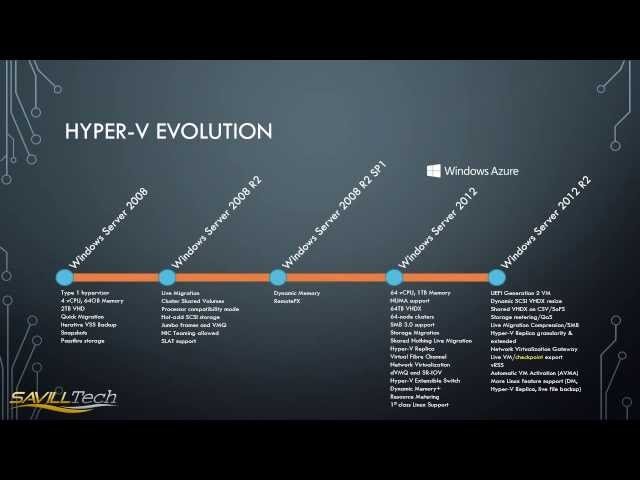
- 1 History of Hyper-V features up to Windows Server 2012 R2
- 2 Video 2-1 : Generation 1 vs Generation 2 VMs
- 3 Video 2-2 : Processor Coniguration
- 4 Video 2-3 : Dynamic Memory
- 5 Video 2-4 : Creating a virtual hard disk
- 6 Chapter 3 - Creating an External Switch
- 7 Using NIC Teaming and a virtual switch for Windows Server 2012 host networking
- 8 Video 3-1 : Core Networking Configurations using SCVMM 2012 R2
- 9 Video 3-2 : Configuring Network Virtualization using SCVMM 2012 R2
- 10 Video 3-3 : Review of HNV Gateway using SCVMM 2012 R2
- 11 Monitoring Hyper-V Traffic in Windows Server 2012
- 12 Video 4-1 : Dynamic VHDX Resize in Windows Server 2012 R2 Hyper-V
- 13 Video 4-2 : Guest Cluster Storage Options in 2012 R2 Hyper-V
- 14 VM Monitoring with Windows Server 2012
- 15 Walk through of clustered Storage Spaces in 2012 R2
- 16 Easily install patches to a VHD or WIM file using this custom PowerShell script
- 17 Maintaining a patched VM image with Hyper-V the easy way
- 18 Video 6-1 : Creating Performance Monitor view for Hyper-V VMs
- 19 Windows Server 2012 R2 Storage Space Overview
- 20 Setting up and using Windows Server 2012 Shared Nothing Live Migration
- 21 Example VM creation using System Center
- 22 Quick creation of a VDI deployment using Windows Server 2012 R2 RDS
- 23 Creating a Minecraft server in Azure Iaas
- 24 Configure Windows Azure Site to Site with Windows RRAS
- 25 Using Static IP Addresses in Windows Azure
- 26 VMDK to VHD Conversion Technologies

