Completed
- 2:21:15 Modeling window
Class Central Classrooms beta
YouTube videos curated by Class Central.
Classroom Contents
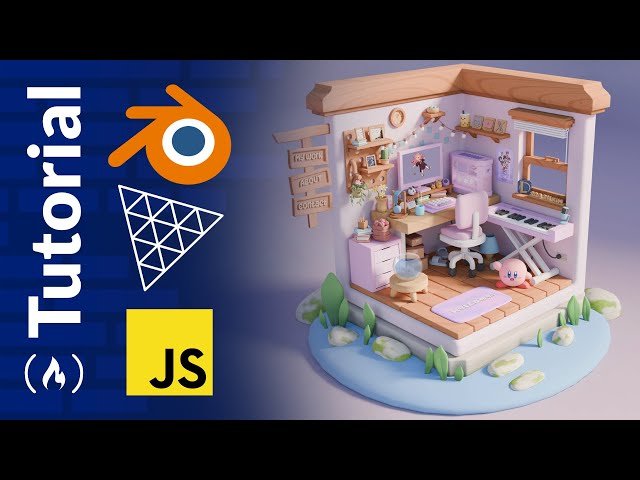
Create a Cute Room Portfolio with Blender, Three.js, JavaScript - Beginner Course
Automatically move to the next video in the Classroom when playback concludes
- 1 46:00 Sorry, accidental cut here, use the loop tools addon we installed and with those faces
- 2 - 0:00:00 Introduction and Project Demo
- 3 - 0:01:29 What we will cover and not cover
- 4 - 0:02:17 What to expect for course structure
- 5 - 0:02:45 Prerequisites
- 6 - 0:03:34 Support the channel and me!!
- 7 - 0:04:03 A brief look at quad topology
- 8 - 0:05:41 Modeling room base and a look at blocking out
- 9 - 0:11:43 Modeling standing desk
- 10 - 0:18:29 Modeling monitor rise
- 11 - 0:21:47 Modeling computer
- 12 - 0:25:13 Modeling table pad
- 13 - 0:25:58 Modeling computer keyboard
- 14 - 0:32:15 Modeling pencils and pencil holder
- 15 - 0:34:12 Modeling flower pot and flowers
- 16 - 0:41:34 Modeling small motivational quote thing
- 17 - 0:44:44 Modeling computer speaker
- 18 - 0:47:19 Modeling headphones and headphone stand
- 19 - 0:58:51 Adjusting room
- 20 - 0:59:46 Modeling computer
- 21 - 1:14:33 Modeling cute character Mr. Whiskers
- 22 - 1:19:50 Modeling coffee mug
- 23 - 1:21:08 Modeling chair
- 24 - 1:31:17 Modeling drawer
- 25 - 1:34:10 Modeling book
- 26 - 1:36:58 Modeling flower basket
- 27 - 1:46:10 Modeling pegboard
- 28 - 1:52:40 Modeling photo frame
- 29 - 1:54:50 Modeling slippers
- 30 - 1:58:31 Modeling storage boxes
- 31 - 1:59:31 Modeling hanging plant
- 32 - 2:13:34 Modeling piano
- 33 - 2:21:15 Modeling window
- 34 - 2:27:11 Modeling microphone
- 35 - 2:30:55 Modeling egg rug
- 36 - 2:31:46 Modeling lamp
- 37 - 2:33:04 Modeling more floating shelves
- 38 - 2:34:24 Modeling sticky notes
- 39 - 2:34:37 Modeling boba plushie
- 40 - 2:37:21 Adding some more details to piano
- 41 - 2:37:42 Modeling logos
- 42 - 2:40:24 Modeling clock
- 43 - 2:41:48 Modeling mini table
- 44 - 2:42:48 Modeling pizza
- 45 - 2:47:12 Modeling soda can
- 46 - 2:49:51 Modeling another hanging plant but with particle system
- 47 - 2:58:18 Modeling eggs
- 48 - 2:58:47 Modeling wall outlet
- 49 - 3:00:34 Adding and working with text meshes
- 50 - 3:05:15 Modeling hanging lights and light bulb
- 51 - 3:10:13 Modeling floor planks
- 52 - 3:11:58 Modeling cords
- 53 - 3:12:50 Modeling room caps
- 54 - 3:16:24 An introduction to lighting and materials
- 55 - 4:07:25 Creating first procedural material as a design exploration
- 56 - 4:29:56 Creating final first procedural material with vector math
- 57 - 4:55:44 Few more tips for baking
- 58 - 4:56:58 Checking face orientations/normals
- 59 - 5:00:26 Glass material and modeling fish
- 60 - 5:01:24 Introduction to baking
- 61 - 5:06:52 UV Unwrapping for texture baking
- 62 - 6:04:03 Render out an image to share!!!
- 63 - 6:06:23 Start baking
- 64 - 6:25:26 Analyze and adjusting bakes and exporting preparations
- 65 - 6:40:24 Exporting and analysis
- 66 - 6:41:49 Setup basic three.js starter with Vite.js
- 67 - 6:45:18 Compressing model and textures
- 68 - 6:48:04 Back to setup
- 69 - 6:55:35 Setting up loaders and loading items
- 70 - 7:04:07 Room material and appearance adjustments
- 71 - 7:06:56 Glass material
- 72 - 7:09:44 Water and bubble material
- 73 - 7:13:15 Screen material
- 74 - 7:17:04 Setting starting camera position and OrbitControls target
- 75 - 7:19:10 Preparing for raycaster interactions and model/texture adjustments in Blender
- 76 - 7:22:27 UV adjusting and texture painting to quickly patch baking errors
- 77 - 7:29:05 Pushing to GitHub and deploying with Vercel
- 78 - 7:30:34 Animating fans
- 79 - 7:32:38 Raycaster click/touch interactions
- 80 - 7:41:38 Basic modal with GSAP animations
- 81 - 7:54:37 Optional Loading custom fonts and SCSS tips
- 82 - 8:01:31 Raycaster hovering interaction with GSAP
- 83 - 8:18:09 Customizing OrbitControls to limit pan and rotation
- 84 - 8:23:53 Intro animations with GSAP
- 85 - 8:35:25 Custom loading screen walkthrough
- 86 - 8:38:06 A brief look at audio with Howler.js
- 87 - 8:38:51 Setting a starting camera position for responsiveness
- 88 - 8:39:41 Final push to GitHub!!!
- 89 - 8:40:05 Final comments, future directions/challenges, shoutouts

